Sunday, September 29, 2013

Initial Thoughts about #Metaliteracy

I've started a number of MOOCs, none of which I have completed (I wrote a post after failing to complete the first one on some thoughts about MOOCs and libraries), although all of which I have learned from. Right now I am taking participating in a MOOC about metaliteracy (look here for more information about what metaliteracy is - the tl;dr definition is "Metaliteracy is an overarching and self-referential framework that integrates emerging technologies and unifies multiple literacy types."

So - I'm behind. I've managed to watch the lectures so far and do some of the readings, but I'm behind. I don't want to talk about that. What I do want to slowly start talking about is the gradual change I am seeing in myself, as I very slowly move away from a more traditional information literacy approach to a changed version that is strongly informed by both metaliteracy and the concept of critical information literacy. (I'm actually supposed to be collecting metaliteracy-related resources this week for the class- I'll try to do that next week (late, as usual...) but I really wanted to post this so I'd have it in my head.)

So last April March February, I had a chance to talk about some of this on campus, when I was invited to give a talk at the WSU Writing Center's Multimodal Composition Across the Curriculum series, Composing the New Classroom: The Teaching and Learning Remix Series. My topic was "Exploring the Connection Between Information Literacy and Technology-Assisted Research" On my campus, the English Composition program is embarking in very exciting ways into a multimodal turn, which I'm really excited about. Meta-literacy (and CIL) are natural partners and modes of connected processes.

You can see from the slides that my understanding of metaliteracy and critical information literacy is still at the tyro level (that's why I'm trying to take this MOOC, after all!) and that I'm probably trying to cram too much into the talk - metaliteracy, critical information literacy, multimodality (sketchnoting!), and tech tools - but I see them as connected, and this talk was very helpful for me in mapping out areas of interest for future study and application. I'll try to write more as I progress in the MOOC and my own self-study.

That's it for now - I just wanted to get this up, and try to find more time to explore this topic as the MOOC continues....


Multimodal Composition Across the Curriculum

Multimodal Composition Across the Curriculum

Monday, March 25, 2013

Lorena’s List: Five Great Technology Tools for Academics (and everyone else...)


Back in February I did a talk for the WSU Writing Program's Multimodal Composition Across the Curriculum series. My topic was Information Literacy and Technology-Assisted Research (I talked about metaliteracy), and I'll post my slides in my next ID post, but in the Q&A I had a bunch of questions about technology. So the convener of the series, Jennifer Lin O'Brian,  asked me to write up a list of my favorite five tools. It was hard to limit myself, and you will see I cheated! The original version of this post can be found here, and I recommend taking a look at the other posts in the Composing the new Classroom (#CtNC) blog. I've been to every session so far, and it has been an excellent series!

1. A reference management program: Zotero [Or EndNote, Mendeley, CiteULike, etc – see this ]
Reference management software helps you keep track of material – books, articles, webpages, documents, multimedia, etc.  You can keep an electronic copy of an item (if available), bibliographic data, and your notes on the item together in a searchable database.
For information on Zotero classes at WSU, see http://libguides.wsulibs.wsu.edu/zotero ; for  information on EndNote classes see http://libguides.wsulibs.wsu.edu/endnote ; for information on other reference managers, contact Lorena O’English (oenglish@wsu.edu ; wsulorena on Twitter, Skype, GTalk, Yahoo IM)
2. A Notes program: Evernote [Or Google Drive, OneNote, SpringPad, SimpleNote, etc.]
The advantage of something like Evernote is that you can access information on multiple devices (desk/laptop, smartphone, tablet). Depending on what device, you can also add in voice notes, images, photographs, etc.  I love the IPad and Android versions! Most of these have freemium options – some functionality for free, more for fee.
3. A screencasting program: Screencast-o-Matic [Or Screenr, Jing, etc.]
Screencast-o-Matic lets you make videos of what is going on your computer monitor, then save the video and/or upload it to YouTube, etc. SoM has a browser version and a desktop version (the desktop version requires a paid subscription, but its not very expensive). Screencasting is great for quick how-tos/demonstrations, reading a student’s paper and providing comments orally, and so much more! You’ll find it’s as valuable for personal purposes as it is for academic uses (I use it to show my Mom how to manage her Kindle via the Amazon website, for example.
4. A Read it Later/Read it Nice application: InstaPaper [and/or Readability, Evernote Clearly, Pocket, etc.]
I love these! I use InstaPaper to save articles that I want to read, but that I don’t think I need to save in my Zotero library – I can read them online,  or I can send them to my Kindle and wirelessly download them (I also use it to read/send scholarly articles if they are available in HTML format, but it does not always work).  Instapaper keeps an archive of all the articles I have saved on it online.  Although IP offers a “read it nice” option, I mix up my products and use Readability – it strips out ads and increases the font and the whitespace, making on-screen reading much nicer.
5. An easy on your eyes application: F.lux
This is so useful! A free program that “warms up” your monitor as its gets darker, so it’s easier to read on screen at night. Not good if you need exact colors, but you can turn it off temporarily.

Tuesday, January 01, 2013

My Favorite Book in 2012

 
I'd have to say it is the conclusion of Galen Beckett's Wyrdwood series, The Master of Heathcrest Hall. The first in the series was The Magicians and Mrs. Quent, the middle volume was The House on Durrow Street. I highly recommend the whole series - its a mashup with magic, fantasy, theatre, and Regency romance, and was creepy, gripping, and romantic. I found it by accident, and I never understood why I heard so little about this series! (Beckett is actually the nom de plume of author Mark Anthony). Find more at http://wyrdwood.net/mrsquent/ .

Saturday, December 29, 2012

A Belated and Limited MOOC MOOC Post-Mortum, OR: What Does Thomas Friedman Have to Do with MOOCS?...

Some years ago I read Thomas L. Friedman's 2005 book, The World is Flat: A Brief History of the Twenty-First Century. I'm actually not writing about that book, though: thinking about MOOCs, I'm actually pondering an interview with him by Tom Nissley that was posted on Amazon that I read before I read  his book. When I read it, this is the part that jumped out at me:
Friedman: There is no substitute for face-to-face reporting and research. But it is now much easier to do all the things that go with it. I basically did all the library research for this book on Google, and it not only saved me enormous amounts of time but actually gave me a much richer offering of research in a shorter time. Many interviews that I conducted first face-to-face, I followed up with e-mail questions and answers. It was enormously helpful to just be able to shoot off a question to Nandan Nilekani or Vivek Paul and get the answer back within 24 hours. I do, though, have a set of e-mail pen pals from around the world whom I have never met, or only met once or twice. Many of them, interestingly, are Muslim women, who use the Internet to reach out, communicate, and question in ways that their traditional society would have normally prevented.
This, to me, encapsulates much of my thoughts about MOOCS, in both positive and negative ways.

First, let me talk about my own MOOC MOOC experience. The MOOC started the week before classes began at WSU. As a librarian, I had a lot to do (especially after a bit of a lost summer due to a concussion, but whatever). Anyway, with every will in the world to fully participate, I actually became a common statistic, effectively dropping out of the class pretty quickly. I did do the first assignment, however - a short video responding to the prompt "Where does learning happen?" (you can see my video at the end of this post). I spent a lot of time on the first assignment and watching other people's videos, and I followed the #moocmooc hashtag on Twitter, and I *meant* to go back and catch up on what I missed because it was interesting, but...it just never happened. Life and work happened, instead.

There has been a lot of discussion about MOOCs in the Chronicle of Higher Education , Inside Higher Ed, and all over the Web on blogs and other conversation places. I'm not going to jump into those conversations; I just want to note a few things that I considered during and after my experience.

Research. Sources. In the interview excerpt above, Friedman boasts that he did not use libraries for his research, relying on Google (Google Scholar did not appear until November 2004 so its unlikely that he was able to make use of it; it's also likely that there was less open access academic/peer reviewed research available at the time, although I'm speaking out of my hat on this). That was his choice (and I personally think it was an irresponsible one, but he's sold millions of books and has a column in the New York Times, and I...have neither ;-). He's got the ear of movers and shakers; his calls and emails get returned and people are eager to talk with him and be quoted by him.

The thing is, some of the people who participate in MOOCs are like me - people who have academic affiliations and access to scholarly resources (including scholarly monographs,databases full of fulltext peer-reviewed journal articles and more) through our institutions. But many others don't have access to those kind of resources, and are limited to what they can find through the open Web. The growth of Open Access means that there is a lot of scholarly work available for free, but it is still (unfortunately) limited. If you don't have access to a really good public library or an institution of higher education, you are on the red ink side of the research access divide...  On one hand, MOOCs are opportunities (if the MOOCer can fully take advantage); on the other hand, there are inherent inequalities that affect the work you do and the expereince you have (access to previously published is only one of them...).  Friedman may have been able to write a big book without using a library, but woe betide any of the students at my university who turn in a research paper that does not cite appropriate and quality sources (some of which came from other institutions via consortial borrowing and interlibrary loan). Friedman may have been able to contact people directly, but he knew who to talk to, and he is someone who's (whose?) calls get returned. (Although that reminds me about the old joke about "Mike Wallace from 60 Minutes is on the phone"...)

On the other hand (I think I may be up to at least four here), Friedman was also able to communicate via his "e-mail pen pals" with people all over the world. What an amazing database that is! Direct interaction with people - people of power, but also people who so often seem to be voiceless or marginalized. In the context of my discussion here, that is a huge strength of MOOCs - the ability to communicate and learn - from and with - people all over the world who bring their own voices, histories, experiences, and more with them. The ability to interview and engage with someone via email or Skype...if they respond to you.

So what am I left with? If you don't have quality and appropriate resources, its hard to create what you need at the level you want to create it at. As a librarian, I worry about the people who don't have connections (through their own affiliations, or...).  When you take a class at a physical college or university, in theory all students in the classroom  have access to the resources available through their institution. It may not always work out that way, but everyone has a library card and remote database access. As far as I know, no MOOC comes with academic library privileges. I wish they did - I wish Coursera and EdX and all the rest of them negotiated article databases and ebook access for their participants, but the Magic 8 Ball says its not gonna happen any time soon, and certainly not for MOOCs that don't charge (oh yeah, that's the "open" part of them, isn't it?). So right off, there is an inequality of access -- a research access/research library divide -- that has a significant chance of affecting the quality of work. Sure, there is lots of good research freely available online (much via colleges and universities and their faculty), and sure people can get around it, but it is a limiter. And it sets people up to have less of a chance to succeed - to learn, and to create their own knowledge built, as knowledge is, by participating in the scholarly conversation that takes place via reading, understanding, synthesizing, integrating,and citing research (and other scholarly or creative work) that has come before.


Tuesday, December 18, 2012

Ereading Apps Frustration...

So I'm up a bit early due to a pot roast, so I might as well write this!

I've been spending some time thinking about ereaders and ereading apps, preparing for a meeting and for revising my library ebook guide and my Packaged Paper for Digital Devices workshop. Reading apps are interesting - if you just want to read an ebook, most of them are fine. Sure, there are certain basic functionalities (font size, background,etc.), but most do the job. When you are thinking of using them for reading academic / scholarly or professional stuff, however, things get more complicated.

Functionality I want (list may be modified in the future -- and yes, I'm asking for a lot):

  • highlight text
  • annotate text
  • export notes and highlights! (this is a biggie...and I'd like to export either individually or collectively)
  • export with metadata: title, author, page number/location
  • text-to-speech
  • endnote links work (optimally foward and backward)
  • Dropbox/SugarSync integration
  • search
  • font size changing
  • backgrounds (I totally love sepia)
  • Granular (not automatic)  social sharing to Twitter, Facebook, etc.
  • Ability to take advantage of all smartphone/tablet sharing options
  • Multi-format (this one isn't so important, but reading both EPUB and .mobi would be nice, and I guess it has to read PDFs although those are problematic)
  • Adobe Digital Editions-compatible
  • EPUB version ? Not sure about this one...

I know there are comparison lists out there [add link(s)], but they don't quite include what I want - so, I guess I'll be working on this! The thing is, I don't think its going to be a successful project. The situation with exporting is especially not likely, unfortunately. I remember an initiative to create some sort of cross-app standard (?) to do this... [look up; check status - probably dead in the water...]

Some of the apps to look at: BlueFire, Aldiko, Moon+, iBook, Kindle (desktop, device, and app), Nook (desktop, device, and app), ebrary, ADE, Mankato.. (no, that is a city; I mean Mantano ;-)


Saturday, July 28, 2012

The Mysterious Foursquare Special...

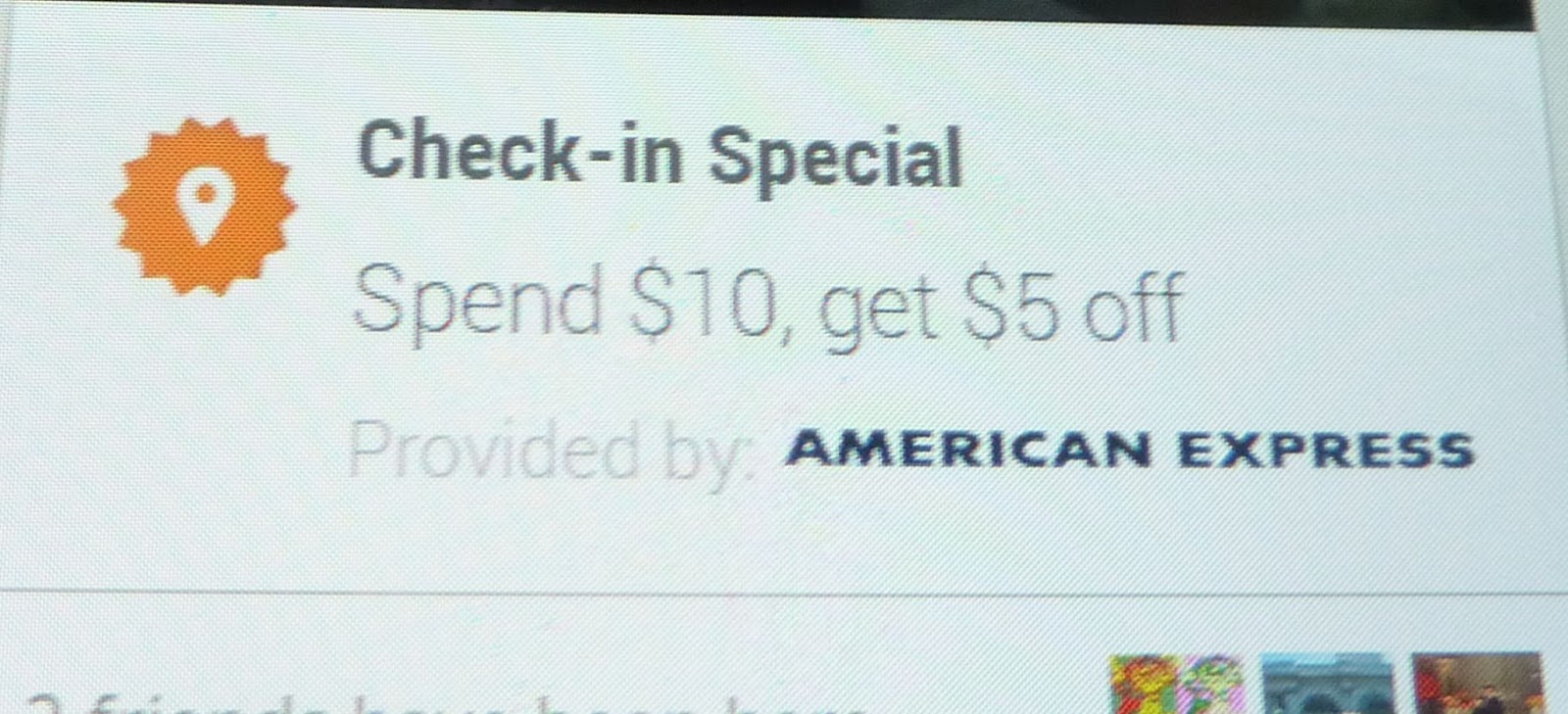
So, there is a home-grown burger place here in Pullman that Mark and I love. I went there yesterday to get some burgers and slushies, and when I checked in via Foursquare, I saw this:
 
It looked a bit too good to be true, but I shrugged and figured I'd show it to the person taking my order and see what would happen. $5.00 is, in fact, $5.00. When I showed my phone to the person at the till, she didn't know anything about it. She asked her supervisor - and then called the manager. No one knew anything about this. No worries on my part, but I noted to them that they might want to check up on this as other Foursquare "players" might be asking about it. 

Afterwards I thought about it - it seemed one of two things was going on. Either 1), the burger place had in fact created a Foursquare special, but had done a lousy job of telling their employees. This was clearly not the case in this instance. The other option, 2) was some sort of Foursquare spam (which reminded me I had gotten at least one piece of email spam via my Foursquare account). 

So just now I was thinking about this again, and I thought to look at the web version of Foursquare. When I did, I saw this:

 Oh! All is explained! Maybe I should have guessed something based on the sponsor. But...in the phone version of Foursquare there was nothing (at least that I can recall)  indicating that this special was just for people paying with an AmEx card - also, I was there on the 27th and it was still showing up on my Android version of Foursqure.  This is clearly confusing, and could result in some ill will directed towards the nice people (and they are!) at the burger joint. Tomorrow I will stop by the burger place and show them this just in case other Foursquare users come checking in...classes will be starting in a few weeks and college students are trickling back into campus. 

Social media. Its tricky...


Tuesday, July 24, 2012

I Drank a Mocha and I Liked It

Looking for something else (a particular quotation about coffee) I found this on my Facebook feed. I wrote it back in 2010, when I discovered coffee. Since then I have indeed given up Diet Coke (and soda in general) but I had to stop the mochas too ($s & #s). Now I love my iced coffees...

 I Drank a Mocha and I Liked It (sung to Katy Perry’s “I Kissed a Girl and I Liked It”) by Lorena O'English on Tuesday, April 13, 2010


This was not the order I planned, not my usual selection
I was so tired, droopy eyes, lost my direction
It’s not my norm, just wanna try a little sip
I’m curious after reading your description

I drank a mocha and I liked it, the taste of its caffeinated chocolate
I drank a mocha just to try it, I hope Diet Coke don’t mind it
It tasted so wrong, it smelled so right, don’t mean I’ve switched for keeps
I drank a mocha and I liked it, I liked it

No, I don’t know how many calories, it doesn’t matter
You’re my experimental cup, just a shot of energy
It’s not what cheap girls do, not how they should spend their money
My tastebuds get so bemused, hard to be frugal

I drank a mocha and I liked it, the taste of its caffeinated chocolate
I drank a mocha just to try it, I hope Diet Coke don’t mind it
It smelled so wrong, it tasted so right, don’t mean I’ve switched for keeps
I drank a mocha and I liked it, I liked it

Thursday, December 29, 2011

The Triumph of Hope over Experiences: New Year's Resolutions '12

I have a history of coming up with amazing New Year's resolutions, then not doing them. Imagine that! Of course, I understand that there is research out there indicating that NYRs may be both unhealthy and unachievable, but as a Diet Coke addict I've never let that sort of thing get in my way! Anyway, I'm hoping that posting these here on ID will help keep me accountable, and maybe I'll even post an update or two as the year goes on.

Resolutions for 2012


1. Exercise more. I've located my FitBit charger and I'll be using the FitBit in 2012 to try to keep track of my steps. In the past when I've used it, I have walked more, so I hope this will continue. We have a treadmill, an exercise bike, and those rubber bandy things,  so even if the weather outside is frightful I have no excuses!
2. Create more. That means writing, drawing, or painting every day. I'm taking an online class on journaling with water colors in late January; I have this and other blogs, including my Lorena's Recent and Retro Reads book review blog; I have ideas for at least two academic articles I'd like to write. So - plenty of opportunity! (Notice that I didn't say any of it (except the articles of course!) had to be good...)
3. Eat better. Mark and I both could stand to lose a few pounds, and we don't eat as well as we should. So - more cooking and more vegetables. And if I'm gonna eat the sweet stuff I love so dearly, at least I can try to make it myself.
4. Go (more)  paperless. I've spent the last few days trying to bring some order to my work and home offices, and I am innundated with paper. I have an eyepad; I have a scanner, I have a smartphone. I have Evernote, Zotero, Diigo, Delicious, Google Docs, the knowledge to easily convert things to be comfortably read on my digital devices, and a host of other tools that can substitute for piles of unorganized and unsearchable processed wood pulp. All I need is to create a workflow...

OK, that's it! I'm not looking to change the world in 2012,  or become amazing - I just want to fix a few things around my physical and mental edges. So come on, new year - let's give it a whirl and see how it goes!

Friday, December 16, 2011

Of Photos and Facebook...

Image Credit: Me (really probably my mom)
As a teen and in my college days, I loved taking pictures with my sucession of inexpensive Instamatic cameras. The whole family would see them, or all my college friends. I can remember sitting with my mom and looking through family albums and hearing stories, or just looking at my own album every so often. There was a period when I didn't take many pictures, but when I moved to Oregon with my job at Project Vote Smart, I started again, and then took even more when Mark and I got together. We had a wedding album, and an everything-else album, but after a while the pictures would be viewed and then put in a shoe box. Eventually our camera broke, and we talked about getting a digital camera, but somehow my enthusiasm for taking pictures had gone away. Mark and I rarely saw our family, and we didn't have kids - all I could think of was putting more pictures in that shoebox that would be thrown away when we were dead and gone. Sure, we scanned a picture every now and then and emailed it to family, but it was clunky. I ended up getting a free Sony camera through credit card points, and played with it a bit while I was couch-bound after Broken Ankles '05 - even posting a few pictures on Flickr that no one I knew ever saw.

Then came Facebook and Twitter. All of a sudden it was a very different story, especially after the introduction of FB's streaming updates. Now I had somewhere to post my pictures and people would see them and comment on them. I started taking pictures again, and eventually got a feature phone that enabled me to automatically send picture to my Wall - replaced with a smartphone in 2010. I put my pictures on Facebook, and also collect them for use in teaching and presentations. Which brings me to Facebook's new Timeline. My prediction...lots of people are going to be looking at (and scannng) old pictures over the next few weeks as they fill out their Facebook Timeline. Here's hoping for some fun bonding time during the holidays as families and friends gather around old photo albums (and shoeboxes!) sharing stories in the process! I know some people are concerned about privacy implications, but the way I figure it it is an opt-in service. Social media gave me back something I really value, and I'm looking forward to filling in my own Timeline...eventually!

Wednesday, June 01, 2011

Adoption Blues...

 I think my folks subscribed to Smithsonian Magazine practically all my life, and my mom gives us a yearly subscription as a gift for my husband. Why am I telling you this? First, because I love knowing what magazines people read, myself- I think its one of those markers, like the condition of your top bedroom bureau drawer, or the inside of your bathroom cupboards (both of which would tell you horrible things about me...) -- but also because last weekend I finally went through a huge pile of papers in my study and found a small "to blog" pile that included the page in the photo next to this. Every so often, our new monthly issue has a cover with this on the back:  Adopt-A-Library by giving them a subscription to Smithsonian Magazine (and save some on your own next renewal). You can specify a library, or have the Smithsonian people select the place for you.

The text notes that "under the pressure of difficult budget restrictions, we have watched with dismay as the number of library subscriptions has dwindled and as fewer and fewer students and members of the general public have access to Smithsonian."  Yeah, I can definitely attest to that. But...

Libraries (and other organizations) have long had programs for donors to give books, databases, benches, and building wings, but this is the first time I've seen a concerted effort to encourage people to give specific subscriptions. Note that they are not asking you to give your own copies of Smithsonian to your local library after you've read them (many magazines and journals have rules against that, actually -- and it can be quite problematic for your library as well).

I'm a bit ambivalent about this. It's absolutely true that Smithsonian is a high quality and engaging magazine. It's also true that libraries' journals budgets are imploding (reduced budgets and annual inflationary increases see to that) but I'm not sure that donations of specific titles by individuals is the way to respond. First, based on my own history, I can see a kind giver just forgetting to re-subscribe the next year, or perhaps having to pinch a few more pennies...

But really, I wonder if I'd rather see concerned library communities, and members of the community, work to improve the budgetary outlook of libraries so that libraries can choose what to purchase based on their established selection criteria and have it done through established vendors and workflows (and I have to note that I don't really know how this program works, and the folks at Smithsonian may very well have a list of libraries that subscribed in the past but had to cancel due to budgetary issues).  On the other hand, an issue of Smithsonian in the hand of a 15-year-old or a 60-year-old is worth a bunch of abstract idealism in the bush, too. It makes me very sad that things have come to this.

Thursday, May 05, 2011

Comics Exhibit Pictures...

I never got around to posting pictures of my comics exhibit (which is still up at WSU's Manuscripts, Archives & Special Collections) , but you can see some fragment of the posters and exhibit cases at  Steve Willis' (Morty the Dog) blog: http://bit.ly/kWehOA (Steve is a comics creator who specializes in minicomix, and a former cataloging librarian at WSU - and he has a *great* blog!). Steve's work is in the exhibit, of course!

Monday, March 14, 2011

Almost Naturally Writing Using NaturallySpeaking...

So last September I tripped and fell and sprained both of my wrists. I had a lot going on so it as I found it very difficult to type I decided to look for a new option and I bought a copy of Dragon NaturallySpeaking version 11 voice recognition software and installed it on my work computer. I wasn't really sure how was going to work out, but I have to say that it was just great -- it was relatively easy to train it to understand the words that I was using and the commands made sense after a while. I confess (um, Drago caught this as "can fast") that I don't use any of the really detailed commands yet, but I actually figured out pretty easily how to make it work for most of the sort of things that I can do. It's nice that in addition to using it to write down text as I speak it, I can also make it work with programs such as my Microsoft Outlook e-mail or Internet browsers, and even manipulate documents in Microsoft Word. Today I finally installed it at home (my version of Dragon allows me to have a copy at work and a copy at home) and I'm actually using it to type up this post. I did have to do some editing - sometimes I use Dragon's editing ability but honestly most of the time it's actually easier to edit manually. But it still saves time! And wrists! Something that I found very interesting was that it was actually harder to write to compose that I thought it would be. It turns out that I had actually trained myself to do academic writing or work-related writing by actually outlining and writing things down and it was difficult to actually think it and say what I needed to say -- the physical act of writing served as a  graphic organizer as it were and switching to Dragon meant that I had to move toward some sort of a cognitive or aural (do I mean oral?) organizer. anyway I've been very happy with Dragon NaturallySpeaking and I look forward to using it even more in composition as I am slowly over time becoming more comfortable with composing as I write I do have to say the one thing that it is amazing forward is to actually read a paragraph out of a book or magazine article or document to convert it to text for incorporating it in something that you're writing. Hmmm... As I look over what I said and Dragon has written it makes me think about the difference between spoken text in written text because I can see that this is actually expressed in a different way than I probably would've expressed it if I had actually written it rather than spoken it.

Wednesday, December 08, 2010

Tuesday, November 30, 2010

My new hobby...

Project Number 1:Daisies
and Project Number 2: Paisley. This one started out as playing with paints, and then I tied it all together...

Wednesday, June 09, 2010

In Memorium: Sieg Vogt

When I got to WSU 10 years ago, I didn't know much about collection development, and Sieg was my mentor - I also learned a lot of even more important stuff at the occasional times I hung out at Rico's (the local faculty/grad student watering hole) with the gang. When he retired from the WSU Libraries, I "wrote" this and sang it (badly and too fast!) standing on a chair at the retirement afterparty at Rico's. I inherited the political science and criminal justice departments from him (speaking as a liasion librarian, of course!) although I'm not sure even after 8 years that I've really begun to fill his big social sciences librarian shoes! He once gave me a vintage IWW (Wobblie) pin that I wear every May Day; I'll be wearing it at his memorial service this Friday. For more on Sieg's amazing life (he was a true firefighting Hot Shot!) see http://vmalf.blogspot.com/ .

Drinking Song, from Sigmund Romberg's operetta The Student Prince (here's a sample of the way its supposed to go: http://www.amazon.com/gp/product/B0013AJOAI/ref=dm_mu_dp_trk4)

Drink! Drink! Drink!
The WSU Libraries will never be the same
Drink! Drink! Drink!
We’ve lost a pinnacle of reference fame

No more will Sieg always be around
To save us when Humanities tries to go out of bounds…

Collection development to hell’s gonna go
We might as well move Hum/Soc right into Rico’s…

Drink! Drink!
Let the toasts start
May Si-eg never part
Drink! Drink! Drink!
Let every librarian salute Siegfried Vogt!
Drink! Drink!

Thursday, April 15, 2010

Another 'Lorena's Look' - More on Ebooks and Ereaders

I can't believe I forgot to post this! Here's my second Lorena's Look column from the WSU New Media Group Ning site (of course, given that Ning will no longer be hosting free groups, it probably won't be accessible for long there anyway...): Lorena's Look: Ebooks and Ereaders . It covers some of the same ground as my last blog post Kindle + Calibre (With a Dash of Samsung Moment)

Here's the original text, with a very few changes:

Is 2010 the year that ebooks and readers will finally go mainstream? There has been a lot of interest in technical and usability aspects of ereaders and the publishing issues inherent in ebooks, but perhaps the ultimate indicator of  `itness' is the publication of a Stephen King novella about a horrific ereader, Ur. For this installment of Lorena’s Look I’ll be checking out some resources relating to ebooks and ereaders - as a new Kindle owner I’ve discovered the value and productivity of reading fiction and other documents on my device, but I also have learned how ebooks and ereaders can be used by anyone with a computer or a smartphone to easily access reading material when you don’t want to carry around an actual printed book -- or bookshelf.

Ebook readers can be hardware or software. Popular hardware devices linked to online bookstores include Amazon’s Kindle, Barnes & Noble’s Nook (soon to be joined by another B&N device, the Samsung E6) and Sony’s family of Readers, but there is a raft of other devices that include the Foxit eSlick ReaderIrex ILiad (not to mention Apple's forthcoming iPad). Most popular ereaders use E Ink technology that makes it very easy to read off the screen, although the iPad will have a computer-like LCD screen. The absence of backlighting and/or (in most cases) a touch screen provides an experience that allows for comfortable long-term reading activity. and the

Software readers don't have those advantages, but they have benefits of their own. Many can be used on desktops or laptops, but they are increasingly being used for reading on smartphones. Both the Kindle and the Nook have applications that work on  smartphones such as the iPhone. A cell phone screen is small, but it is surprisingly easy to read off (although battery life and tired eyes may make them better for shorter reading stints). The Kindle and Nook readers have a built-in benefit in that they are tied to the Amazon/B&N servers, and so users can pick up where they left off in a book, whether reading on their phone or their dedicated ereader.

Other free software applications include Stanza and MobiPocket Reader (both owned by Amazon, actually) -- both of these can be used on desktops/laptops as well as smartphones. Many other ereading programs are available as free or paid applications that can be downloaded for particular cellphone flavors.

Converting and Managing E-books and E-Documents

Ebooks are files, and like all files they exist in many different file formats which can be read by particular devices. The closest thing to standard formats are the PDF, Mobi, and EPub formats, which are widely used. Due to the lack of an official file format compatibility standard and the intellectual property issues of Digital Rights Management (DRM), file formats can be a big headache. Amazon's Kindle, for example, has its own proprietary format, AZW, and if you purchase an ebook from Amazon it will come in that format. AZW is a actually a slight variation on the Mobi file format, however, so Kindles can read documents that are Mobi files. The Kindle does not support the EPUB standard, although the Nook does. So what to do? If you have an ebook or edocument that has DRM content, there is nothing you can legally do except read it on the reading platform it is meant for (i.e. if you bought it from Amazon it can only be read on the Kindle; if it is an Adobe Digital Editions file, it has to be read in that interface. However, if your document does not have DRM attached, you can convert it from one file format to another so that it can be read on different devices.

Under my office desk I have a stack of PDF printouts that somehow I have never gotten around to reading. Now that I have a Kindle, I no longer print out my PDFs, but instead convert them so that I can easily read them on my device (there is a significant caveat, however; as the college students who participated in Amazon's textbook trial noted: the lack of an easy way to annotate documents on the Kindle limits its use). I could email them to Amazon to be converted to a form that my Kindle 2 will easily read -- for free if I drag'n'drop them on to my Kindle myself, or for a small fee if I have it done automatically via Amazon's WhisperNet -- but I've discovered that in most cases I'd rather do it myself.

There are a number of ways to convert ebook file formats, but I'm going to briefly mention just two of them. Calibre and MobiPocket Reader/Creator allow you to not only convert file formats but also store, organize, and manage your ebook files. I use Calibre, and with it I can import a document, for example an out-of-copyright book I downloaded from Google Books in the EPUB format, or an article PDF I found online or in a library database, or even a Word document I created myself (although I have to convert Word files to RTF or HTML documents first). I can convert it to the Mobi file format (or vice versa) and add in my own metadata, including complete bibliographic data and tags that will allow me to easily filter and sort my Calibre library. I can then easily export it to my Kindle -- and I have a backup saved on my computer. Later on I may choose to delete the item from my Kindle, but its always available on my computer if I want to read it again. Calibre can also automatically download updated blog posts for ereader viewing, and has its own built-in ereader if I wanted to use it (I don't - if I were going to read an ebook on my computer I would prefer to use Stanza or Kindle for Windows). Calibre also works with smartphone applications, including WordPlayer on the Android platform and Stanza on the iPhone/iPod Touch. I have to admit that the formatting can be a bit awkward, but I find that that rarely gets in the way of my reading experience.

Ebook Sources

WSU Libraries
The Libraries does purchase ebooks in a number of formats, including NetLibrary, Ebrary, EBL and others. Unfortunately these formats generally do not allow downloading and must be read on your computer screen (yes, we know...

Free Sources
Google Books(for out of copyright) – epub and pdf
And many others...
Note: These sources provide out-of-copyright works or works that have been made publicly available by their rightsholders. There is considerable content overlap, but books from different sources may have noticeable differences in the quality of their formatting.

Free and (Some) Free
Publishers with proprietary hardware: Amazon and Barnes & Noble

Further Reading
Giz Explains How You're Gonna Get Screwed by Ebook Formats - This is an excellent explanation of file formats and more - read it and weep...

How Can I Create EPUB files from my Books? - a good overview of conversion utilities

Hamlet's Blackberry: Why Paper is Eternal (Soon to be expanded and published as a book - this essay is very much worth reading!) This version of William Powers' essay is from Scribd and can be downloaded as a PDF or TXT file or sent to many ereading devices directly: See the upper left corner when you click on the book:
E-Books Must Be Accessible(from the Chronicle of Higher Education; if you are off the WSU campus network you will need to go through the WSU Libraries proxy server in order to read the full article) - Provides an overview of some issues relating to accessibility.

Sunday, March 21, 2010

Kindle + Calibre (with a dash of Samsung Moment...)

So last Christmas Mark gave me a Kindle. I warily charged it up, bought a book from Amazon (downloaded almost immediately via Whispernet) and started reading. Within minutes I had forgotten I was reading from a device, and I was just reading. A lot. Three months later I absolutely love my Kindle (its all about the eye-friendly E Ink and long battery life), and I love its features (especially landscape viewing and that wonderful font resizer). I also love the bare-bones browser -- it comes in handy every so often (for example, before I bought my Android app phone I used it to check in to FourSquare). I love it reading in bed, and I love it when I'm travelling. I've bought some books from Amazon and no doubt will buy many more in the future, but I'm kinda cheap, so I've been focusing on finding free books (mostly older out of copyright books) from Project Gutenberg and the Internet Archive and newer books from combination free/pay ebook publishers and aggregator sites, including Amazon itself. (Even the free Amazon books have DRM, I should note, however).

I also use my Kindle to read articles and other books/documents - mainly PDFs, although some come in other file formats (for example, many free books come in the EPUB format). While the Kindle can read native PDFs it really doesn't do it well on the Kindle 2 (no font changing or text-to-speech) so I convert my PDFs to the Mobi format so the Kindle can easily read them. I use an amazing free program called Calibre. Calibre enables me to convert to and from a wide range of non-DRMed file formats (individually or in bulk) and it also allows me to manage and sync my documents directly to my Kindle or other ereader; it has other features that include adding or fixing metadata, keeping a document library archive on my computer, and even downloading and converting websites, newspaper sites, or blogs automatically (check out its features here). I generally plug my Kindle into my computer to add items to my Kindle via autosync and USB, but I could also use its content server to access my items online, or have them sent to my Kindle outside of Amazon's system.Calibre works with pretty much all ebook devices/readers, including the Barnes & Noble Nook and the Sony Reader(s) and comes with its own integrated ebook viewer.

While the Kindle does have a keyboard and can highlight, clip and annotate texts, it's a bit clunky. So most of the items I read on it are recreational reading (mainly fiction) and PDF or Word documents (Calibre doesn't do MS Word, so I have to first convert Word files to RTF or Open Office format) that I don't feel the need to manually mark up. To be honest, that is pretty much all of them these days...I have a huge pile of printouts under my desk at work that I never quite managed to read pre-Kindle. Now I rarely print out article PDFs any more unless I know I will want a print copy for a particular purpose - I send them to my Kindle, and then I actually read them (sometimes I lazily use Amazon's service that allows me to email PDFs and have them converted and downloaded automatically via Whispernet- its actually pretty cheap!).

I can read those documents on my cell phone as well, and Calibre facilitates that too. The Kindle has applications for the desktops/laptops and for the BlackBerry, iPhone/Touch, and iPad (I think? Yup) and although it does not yet have an Android application, I use the WordPlayer app - it doesn't work with the Kindle, but it does work with Calibre, so I can read all my non-Amazon stuff  if I wanted. Do I? I confess I was very skeptical, but I have been reading Cory Doctorow's Little Brother on my Samsung Moment using WordPlayer, and I'm happily surprised at how easily its going along.

Now that I have my Kindle-Moment-Calibre troika, I have found that it has positively affected my ability to keep up with professional articles from a wide range of sources, and has enhanced my down-time reading. I've been having a blast working my way through old favorite authors, and discovering new ones, I think this summer I'm doing to work my way through Trollope, and maybe read Galsworthy's Forsyte books again. I'm kinda addicted to reading, and while I still read paper books (fondly known as Dead Tree Books (DTB) in the Kindle community) I appreciate the convenience of my new alternatives.


Some link love:
  • SFBags/WaterField makes a great sleeve case for the Kindle- I have one with a strap, so I can carry my Kindle like a purse if I want.
  • I've dressed my Kindle with a decal from  DecalGal - I choose the burlwood option
  • There are some excellent ebook blogs that I will add here later...

Monday, January 18, 2010

A Little Blogging on the Side: wsu worldcat and Lorena's Look: Screen Reading tools...

I've been added as a co-blogger to the new wsu worldcat blog - you can read more about it and what it is all about in its intro post . I'm really excited about WSU WorldCat (the resource) as well as talking about it on wsu worldcat (the blog)!

As long as I'm talking about wsu worldcat, I might as well mention that I've started writing an every-so-often column for the WSU New Media Group Ning site called "Lorena's Look."
I can't link directly to it (right now its at the bottom of the page, but I'm sure it will be replaced by something else pretty soon) so I'm going to grab the content and paste it in here:

Lorena’s Look: HTML Screen Reading

These days many of us do a fair amount of reading online – news and journal articles, long texty HTML documents, etc. The problem is that reading from your computer screen for longer than five minutes is not very much fun. Over the past year, I’ve found a few tools that can make the HTML online reading experience much better.

Readability; (Firefox, Internet Explorer, Safari) lets you customize your reading experience (style, font size, and page margin). Go to the free site, then drag the bookmarklet to your browser bar (it’s a little different for IE, actually – you will need to right click on your mouse). When you are about to read from a Web site, click the link in your browser bar, and it will delete any advertisements, increase the margins, and increase white space to make the reading process much more comfortable. You’ll see three icons in the upper left corner; these enable you to reload the original page, print the page, or email the page.

Not all Web pages work with Readability, and if it is a page that continues through additional page links (like many newspaper pages) you will need to reload the original page, go to the next page, and click the Readability bookmarklet again. Alternatively (and preferably) look for a print option that presents the article all on one page, and then click on the bookmarklet.

Readability has many admirers (including New York Times technology writer David Pogue, who named it one of the year’s best tech ideas for 2009 , but there are alternatives. Tidy Read;( Firefox, Internet Explorer, Chrome, iPhone/Touch) operates in a very similar fashion but provides customization options for each page it is used on. The Printliminator and Clippable allow you to choose particular parts of the Web page to modify. The Printliminator was originally intended to clean up printouts, but can be used for reading ease as well.

Now that you have installed Readability, TidyRead, Printliminator or Clippable (try them all out to see which one you like best!) you can make your reading even easier by eliminating the need to scroll down the page through the use of Autoscroll; (Firefox, Safari, maybe Internet Explorer). This bookmarklet will automatically move the screen forward at a pace you set using numbers (1 is very slow and 9 is pretty fast).

Heads-up: I received a Kindle as a Christmas present, so my next column for WSU’s New Media Group will discuss free ebook tools and resources.